How to control the volume of C2N-AMP-6x100
Is it possible to use Crestron Studio® generated programming to control the volume of C2N-AMP-6x100? Can I connect the room output of C2N-AMP-6x100 directly to the room audio? Do I have to write my own programming to do that?
Yes , the room outputs of C2N-AMP-6x100 can be connected directly to the room audio allowing Crestron Studio® generated programming to be used to control the volume. No custom programming is needed, just follow the steps below:
- Create new Crestron Studio® system or open an existing system created in earlier version of Crestron Studio®
- Add new C2N-AMP-6x100
If working in a system project created in earlier version of Crestron Studio® either replace C2N-AMP-6x100 with itself or delete the existing C2N-AMP-6x100 and then re-add a new instance of the device.
- In Source Routes select C2N-AMP-6x100 and navigate to Connector 31 or Connector 32 in the Media Connectors tab
- Select Location Audio Provider from the drop-down list for the Connector 31 Type or Connector 32 Type property
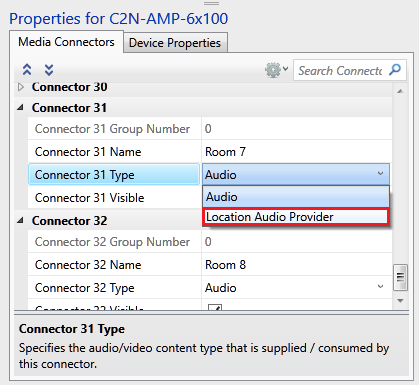
This will replace the general audio output port of the source route model of C2N-AMP-6x100 with a line level output allowing the output to be connected directly to the Media room.
- Connect the line level output of C2N-AMP-6x100 to the Speaker input of the Media room
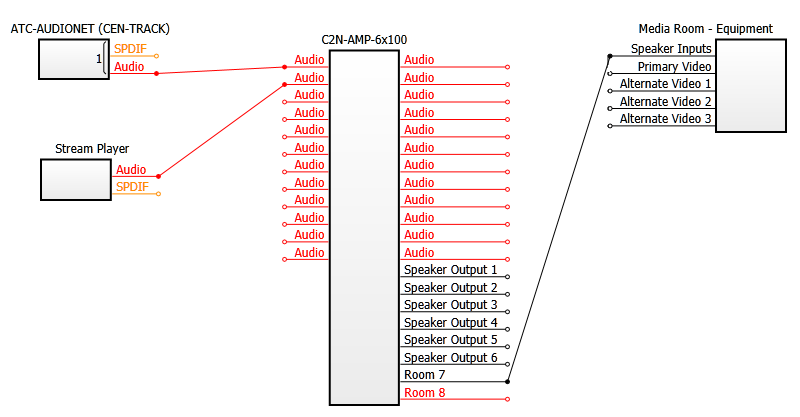
- Add any additional devices and create any additional Source Routes connections as needed
- Build and upload the system project to your control system and touch screen(s)